Getting started with Zephyr on Ubuntu
How I installed Zephyr RTOS on Ubuntu Linux and flashed my first app to an nRF5340 DK, coming from bare metal.
Key specs
| Board | Nordic nRF5340 DK |
|---|---|
| SoC | nRF5340, two Arm Cortex-M33 cores (application + network) |
| Computer | Ubuntu Linux |
| Tools | west, Zephyr SDK, CMake, Ninja |
| Debugger | SEGGER J-Link, built into the DK |
| First app | Blinky (samples/basic/blinky) |
Block diagram
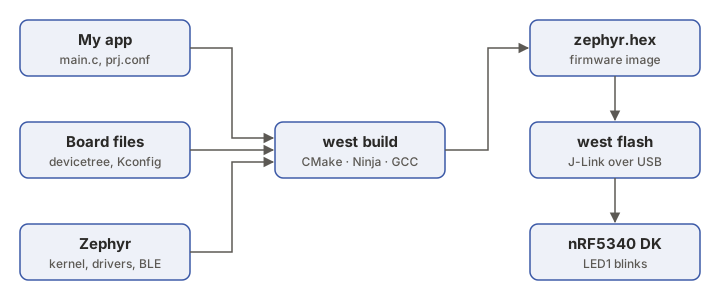
Overview
For years I wrote firmware on bare metal. I had my own main loop, interrupts, and drivers written straight on the registers. I wanted to try Zephyr, the open-source RTOS that Nordic, NXP, ST and many others now support. Here is how I set it up on Ubuntu and got my first app running on an nRF5340 DK.
Installing Zephyr on Ubuntu
1. Install the system tools
$ sudo apt update && sudo apt upgrade
$ sudo apt install --no-install-recommends git cmake ninja-build gperf \
    ccache dfu-util device-tree-compiler wget python3-dev python3-venv python3-tk \
    xz-utils file make gcc gcc-multilib g++-multilib libsdl2-dev libmagic1
2. Create a Python environment and install west
west is Zephyr’s command-line tool. It downloads the code, builds and flashes. I keep it in its own Python environment, so it doesn’t mix with Ubuntu’s Python.
$ python3 -m venv ~/zephyrproject/.venv
$ source ~/zephyrproject/.venv/bin/activate
$ pip install west
Every new terminal needs this command again before using west.
$ source ~/zephyrproject/.venv/bin/activate
3. Download Zephyr
$ west init ~/zephyrproject
$ cd ~/zephyrproject
$ west update
$ west zephyr-export
$ west packages pip --install
west update takes a while. It downloads Zephyr and all its modules, including the vendor libraries.
4. Install the Zephyr SDK
The SDK holds the compilers (GCC for Arm and other architectures) and debugging tools.
$ cd ~/zephyrproject/zephyr
$ west sdk install
5. Install the tools to flash the nRF5340 DK
The DK has a SEGGER J-Link debugger on board. To flash it from Linux I installed two tools.
- the J-Link Software and Documentation Pack from SEGGER (the
.debfile for Ubuntu), - nRF Util from Nordic, then its device commands.
$ nrfutil install device
6. Build and flash Blinky
The nRF5340 has two cores. Apps run on the application core, cpuapp.
$ cd ~/zephyrproject/zephyr
$ west build -p always -b nrf5340dk/nrf5340/cpuapp samples/basic/blinky
$ west flash
LED1 on the board starts blinking.
7. See the serial output
The hello_world sample prints to the DK’s USB serial port.
$ west build -p always -b nrf5340dk/nrf5340/cpuapp samples/hello_world
$ west flash
$ sudo usermod -aG dialout $USER   # once, then log out and back in
$ screen /dev/ttyACM0 115200       # quit with Ctrl+A, then K
What I learned - bare metal vs Zephyr
Bare metal means my code is the only thing on the chip. There is a while (1) loop, interrupts for anything urgent, and drivers written against the registers. It’s small, fast and fully predictable, and I know every line that runs. For a simple product, like one sensor and one job, it’s still the right choice.
It gets hard as the project grows. With BLE, a display, logging and a sensor all at once, the main loop turns into a pile of flags and state machines, and one slow task delays all the others.
Zephyr gives me four things.
- Threads with priorities. Each job gets its own thread, and the scheduler runs the most urgent one first. Mutexes, semaphores and message queues let threads share data safely.
- Ready-made stacks. Bluetooth LE, USB, networking, file systems, logging and a shell are all included, maintained and tested.
- Portable code. The hardware is described in the devicetree and features are switched on in Kconfig (
prj.conf). The same Blinky builds for hundreds of boards by changing only-b. - Both cores handled. On the nRF5340, Zephyr can run the Bluetooth controller on the network core for me. On bare metal I would have to manage both cores and the communication between them myself.
There is a price. Zephyr takes more flash and RAM, the build system (west, CMake, devicetree, Kconfig) takes time to learn, and errors can be harder to trace back.
My rule of thumb. For a small, single-purpose device, I use bare metal. As soon as I need several things running at once, wireless connectivity, or code that should survive a change of chip, I use Zephyr.